Showing posts with label KH100. Show all posts

Tuesday, 6 August 2019

Lonsdor KH100 simulate what chip and generate what chip & key?

Topic: being a Remote Key Programmer, Lonsdor KH100 can simulate what chip? can generate what chips and what keys? what special features Lonsdor KH100 has?

Firstly, come to Lonsdor KH100 menu, you can see it has options: 
Identify Copy
Access Control Key
Simulate Chip
Generate chip
Generate key
Identify Coil
Remote Frequency
Special Function
Settings
lonsdor-kh100-simulate-chip-generate-chip-key-01


Next is to select "simulate chip" and has a chip list:  
Simulate 4D chip
Simulate 46 chip
Simulate 48 chip
Put Lonsdor KH100’s antenna at the ignition switch(as shown), choose the corresponding chip
type to simulate.
lonsdor-kh100-simulate-chip-generate-chip-key-02

lonsdor-kh100-simulate-chip-generate-chip-key-03


Next is to select "Generate chip" and has a chip list: 
4D
46
48
T5
7935
8A
4C
Others 
lonsdor-kh100-simulate-chip-generate-chip-key-04


Put the above chip into the induction slot(as shown), choose the corresponding chip to operate according to the prompts.
lonsdor-kh100-simulate-chip-generate-chip-key-05


Note: some chip data will be covered and locked.

Then is to select "Generate key" and has a menu:
Generate Remote (Generating various type)
Generate smart key
lonsdor-kh100-simulate-chip-generate-chip-key-06


1) Lonsdor KH100 generates Remote, the following cars' remote is tested ok: 
Buick
Ford
GMC
Hammer
Cadillac
Chrysler
Lincoln
Chevrolet
Audi
BMW
Benz
VW
Jaguar
Land Rover
Opel
Skoda
Volvo
Honda
Toyota
Lexus
Suzuki
Mazda
Luxgen
Nissan
Acura
Kia
Baojun
Beiben H
Baic
Besturn
BYD
Changhe
Maxus
Dongfeng
Southeast
PLC
Steel Ma
Steel Lea
lonsdor-kh100-simulate-chip-generate-chip-key-07

lonsdor-kh100-simulate-chip-generate-chip-key-08

lonsdor-kh100-simulate-chip-generate-chip-key-09

lonsdor-kh100-simulate-chip-generate-chip-key-10

lonsdor-kh100-simulate-chip-generate-chip-key-11


Enter [Generate key]->[Generate remote], select the corresponding vehicle type to
generate remote control(as shown) according to different regions.
lonsdor-kh100-simulate-chip-generate-chip-key-12


2) Lonsdor KH100 generates a smart key, the following cars are tested OK: 
Jeep
Baic
BYD
Buick
Dodge
Southeast
Geely
Cadillac
Maserati
lonsdor-kh100-simulate-chip-generate-chip-key-13


Enter [Generate key]->[Generate smart key] menu, select the corresponding vehicle
type to generate smart key/card(as shown) according to different regions.
lonsdor-kh100-simulate-chip-generate-chip-key-14


Put KH100 antenna close to the pre-determined position. If signals are identified, the device will make sounds continuously.
lonsdor-kh100-simulate-chip-generate-chip-key-15

Lonsdor KH100 has special features
Detect Infrared signal
Toyota smart key (Unlock Toyota smart key)
Garage door
Fixed code remote copy
Fixed code remote editing
and more...
lonsdor-kh100-simulate-chip-generate-chip-key-16

1) Detect infrared signal
Put remote control at the infrared signal detection area, press the remote's button
once. When the light on KH100's screen is on, it indicates there is an infrared signal,
otherwise there is no signal(see below pic).
lonsdor-kh100-simulate-chip-generate-chip-key-17

(signaled)
lonsdor-kh100-simulate-chip-generate-chip-key-18

(no signal)

2) Unlock Toyota smart key
Put in smart key, click OK to operate.
lonsdor-kh100-simulate-chip-generate-chip-key-19

lonsdor-kh100-simulate-chip-generate-chip-key-20


Enjoy

Lonsdor KH100 update is possible.  Enter the settings menu, connect the device to a network, then select [check for updates], one-click online upgrade.


Thursday, 6 June 2019

Lonsdor KH100 Key programmer Functions introduction

Lonsdor KH100 has many functionalities including Identify Copy/ Coil, Access Control Key, Simulate/ Generate Chip, Generate Remote/ Smart key(card), Remote Frequency, etc.

In details...

lonsdor-KH100- 01

1. Identify Copy
Enter this menu, follow the system prompts to operate (as shown).

lonsdor-KH100- 02
2. Access Control Key
Enter this menu, follow the system prompts to operate (as shown).
lonsdor-KH100- 03

3. Simulate Chip
Put KH100’s antenna at the ignition switch(as shown), choose the corresponding chip type to simulate. This device supports below chip types:
①4D ②46 ③48
lonsdor-KH100- 04
4. Generate Chip
Put below types of the chip into the induction slot(as shown), choose the corresponding chip to operate according to the prompts. This device supports below chip types:
①4D ②46 ③48 ④T5 ⑤7935 ⑥8A ⑦4C ⑧Other
Note: some chip data will be covered and locked.

lonsdor-KH100- 05
5. Generate Remote
Enter [Generate key]->[Generate remote], choose the corresponding vehicle type to generate remote control(as shown) according to different regions.

lonsdor-KH100- 06
6. Generate Smart key(card)
Enter [Generate key]->[Generate smart key] menu, choose the corresponding vehicle type to generate smart key/card(as shown) according to different regions

lonsdor-KH100- 07
7. Identify Coil
1) Search smart induction area
Connect remote key with remote connector, Put KH100’s antenna close to the predetermined position. If the inductive signal is identified, the device will continuously make sounds, please check if the position is right(as shown below).

lonsdor-KH100- 08

2) Detect IMMO
Connect remote key with remote connector, Put KH100’s antenna close to key identification coil, and use the key to turn ignition ON. When KH100 buzzer beeps, it means the signal is detected.

lonsdor-KH100- 09
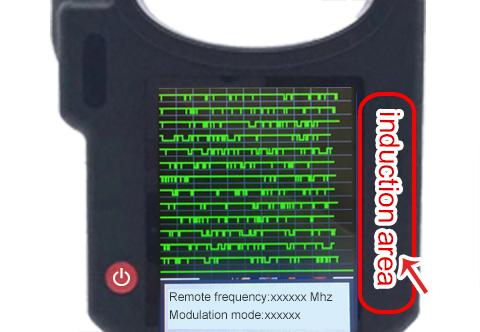
8. Remote Frequency
Enter this menu, put remote control at the device’s induction area to detect remote frequency

lonsdor-KH100- 10
9. Special function
Include: detect infrared signal, unlock Toyota smart key, More functions, to be continued...
1) Detect infrared signal
Put remote control at the infrared signal detection area, press the remote's button once.
When the light on KH100's screen is on, it indicates there is an infrared signal, otherwise there is no signal (see below pic).
lonsdor-KH100- 11
2) Unlock Toyota smart key
Put in smart key, click OK to operate.
lonsdor-KH100- 12


More detailed info please refer to the user manual: http://www.obd2shop.co.uk/upload/pro/19060315596181397295.pdf

2024 Toyota Corolla Add Smart Key with Lonsdor K518 Pro + LT32

This guide covers how to add an LT32 Smart Remote and reprogram the OEM smart key on a 2024 Toyota Corolla using the Lonsdor K518 Pro . Too...