Updated Device: Lonsdor K518
Updated Condition: for all K518 devices with working normally
Updated Content: Added Hibernation function; Kernel update supported
Updated Version: K518 APK V1.5.25
Preparation for Update:
1. Power on the device or keep the battery level over 80%.
2. Make sure wifi network is in good condition and the device receives signal normally
Update steps:
Step 1. Click [One key update] and skip to below interface. Then click the first button to update system. When the update complete, click [OK] to reboot the device.


Step 3. Click [Update Kernel] first and skip to below interface, then press [Update] to update the kernel.
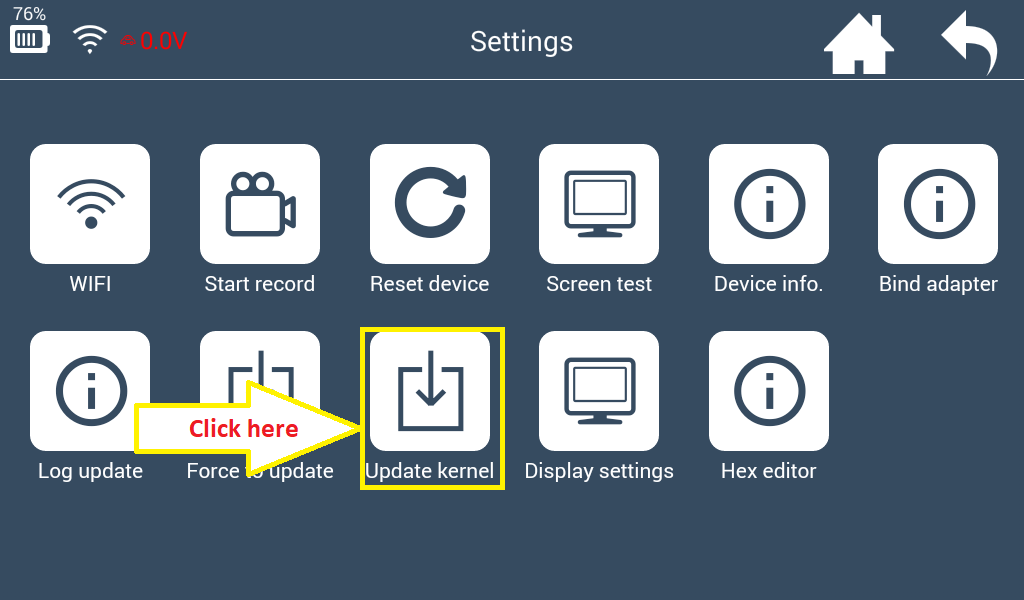

Step 4. Click [Install] after updating the kernel file. And the device will reboot to install kernel.

Step 5. Blank screen is normal during the installation. The whole process will take 5 minutes, be patient to wait and don't restart the device manually.


Step 6. The update complete when the password input interface appears. Screen auto-lock in the [Display Settings ] is added.

Step 7. Enter [Settings]→[Display Settings] to adjust the screen brightness and screen auto-locking time.

8. The benefits for update: Save power to prolong stand-by time. Auto standby function can prevent the device from being overheated in hot summer.
Hibernation Function update instruction Download: http://www.obd2shop.co.uk/upload/pro/lonsdor-k518ise-hibernation-function-update-instruction.pdf
Lonsdor k518ise Key programmer for sale: http://www.obd2shop.co.uk/wholesale/lonsdor-k518ise-key-programmer.html


