Showing posts with label Lonsdor K518ise Update. Show all posts

Sunday, 16 May 2021

Lonsdor K518ISE/K518S Volvo Super Update Car List

Lonsdor has released Volvo Super Update software authorization on 14th, May. 2021. It applies to Lonsdor K518ISE & Lonsdor K518S key programmer.


Volvo Car List Updates:

Added XC40(2020-), XC60(2018-), XC90(2015-), S60(2020-), S90(2017-), V60(2018-), V90(2016-), support data reading & programming.


Note: This function requires opening a Volvo license(with free LYNK&CO). Please check with the Lonsdor dealer for the details.

lonsdor-k518ise-k518s-volvo-super-update-car-list-1

Lonsdor K518ISE can program Volvo XC40 all key lost success.

Operation video:

https://www.youtube.com/watch?v=7ylzQXARE8U

Procedure:

It requires dismantling CEM above the driver’s pedal to read data beforehand. Please reinstall the CEM back to the car after saving data completed.


Connect Lonsdor K518ISE with OBD2 port, press

Volvo XC40 >> 2020- >> All smart key lost >> Select the saved CEM FLASH data file

lonsdor-k518ise-k518s-volvo-super-update-car-list-2

lonsdor-k518ise-k518s-volvo-super-update-car-list-3

All key lost will delete all programmed keys, please prepare keys to be programmed.

Current key number: 1


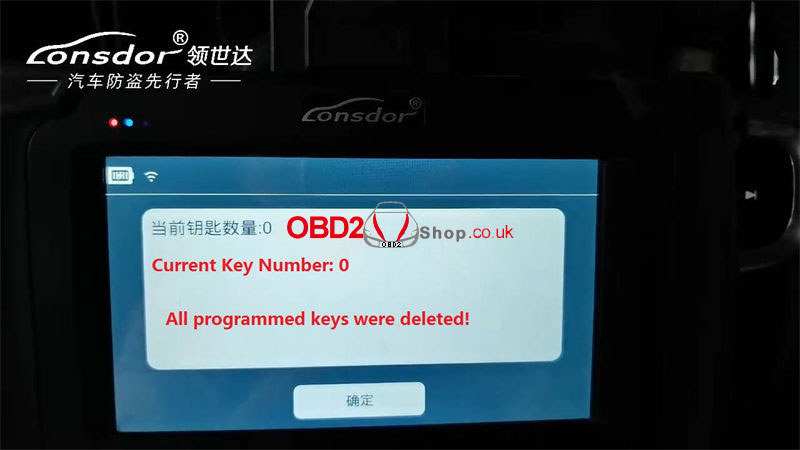
All programmed keys were deleted, press “OK” to go on adding keys.

Current key number: 0


Put the key to be programmed in the induction area(armrest box).

lonsdor-k518ise-k518s-volvo-super-update-car-list-4

lonsdor-k518ise-k518s-volvo-super-update-car-list-5

lonsdor-k518ise-k518s-volvo-super-update-car-list-6


Program 1 key success, press “OK” to add more, press “Cancel” to complete.


Test the new key, it does work well.

Key programming was done!

lonsdor-k518ise-k518s-volvo-super-update-car-list-7

lonsdor-k518ise-k518s-volvo-super-update-car-list-8

lonsdor-k518ise-k518s-volvo-super-update-car-list-9


More Volvo latest car key programming to be tested...

https://www.obd2shop.co.uk/


Tuesday, 26 May 2020

Lonsdor K518 Update! Read PIN Code Offline for More GMs

Breaking news! Released just on May 25th, 2020, the latest upgraded Lonsdor K518ISE key programmer now can read PIN code offline for more cars made by Buick, Chevrolet, and Cadillac.

Lonsdor k518 update car list is as below:

Buick:
Verano 2019
Excelle 2018-2019
Lacrosse 2019-2020

Chevrolet:
Cruze 2019
Equinox 2019
Traiblazer 2019
Malibu XL 2019

Cadillac:
XT4 2019
XT5 2019
CT6 2019

k518-update


K518ise programmer supports various car models from Asia, Europe, America, etc. Check the full car list via Lonsdor official website: http://en.lonsdor.com/html/function
https://www.obd2shop.co.uk/wholesale/lonsdor-k518ise-key-programmer.html

Tuesday, 18 June 2019

Lonsdor K518ise/K518S one year update cost (you should know)

This is the one-year update cost of Lonsdor K518ise and Lonsdor K518S. Hope it helps!

Lonsdor K518ise:

Menus are divided into two parts: free menus and subscribed menus.

1. Free menus are free for lifetime.
2. Subscribed menus can be used for free for 180 days. You need to pay for them after the trial period. After the trial period, subscribed menus will not work properly if you don’t pay. And the menus will disappear after updating the device.
A. 365 days is a period and the price is USD600 per period. One year period starts from the day that you pay.
B. Purchase menus with a dealer. You can use the menus normally and permanently after payment.
C. Menus which you purchase includes subscribed menus that have been released and that will have been released in one year period.
D. After one year, new updates for subscribed menus require extra payment.
Notice: For k518ise subscribed menus once you buy it, it won’t disappear, buying the first year upgrade is the most cost-effective.
lonsdor k518ise


Source: http://www.obd2shop.co.uk/wholesale/lonsdor-k518ise-key-programmer.html


Lonsdor K518S:

Menus are divided into two parts: free menus and subscribed menus.

1. Free menus are free for lifetime.
2. Subscribed menus can be used for free for 180 days. You need to pay for them after the trial period. After the trial period, subscribed menus will not work properly if you don’t pay.
A. 365 days is a period. One year period starts from the day that you pay.
B. Purchase menus with a dealer. You can use the menus normally after payment.
C. Menus which you purchase includes subscribed menus that have been released and that will have been released in one year period.
D. After one year, you need to pay for subscribed menus again if you need to use them.
Notice: Subscribed menus will also disappear after the upgrade time expires

lonsdor k518s

Source: http://www.obd2shop.co.uk/wholesale/Lonsdor-k518s-key-programmer.html

For Lonsdor k518s:
one-year version SK213-S1
English version with full functions, FREE for the first 6 months, then you should pay for another 800 USD for every next year, second-year cost 600usd, third-year 300usd. The fourth-year to be determined
lifetime version SK213-S2
lifetime version with full authorization, but you must have the machine SK213-B
By the way, Both k518ise and K518S now are in 618 Promotion, you can not miss!
www.obd2shop.co.uk

Wednesday, 19 December 2018

Lonsdor K518ISE firmware update package update and how to update?

Dear Lonsdor K518ISE users, just follow the next steps to download the firmware update package and follow the procedure to update the firmware. It is provided by Lonsdor Engineer so you don't need to worry it won't work.

Step 1. Download free Lonsdor K518ISE firmware update package
URL: https://mega.nz/#!ZYIg1CbJ!HCAZJTPbtJ3VY3X51eJt42a_673-MT8xQq61Qvl17K8

Step 2. How to use:
1. Download and unzip the attached file, you will get

lonsdor-k518ise-flashing-package-01

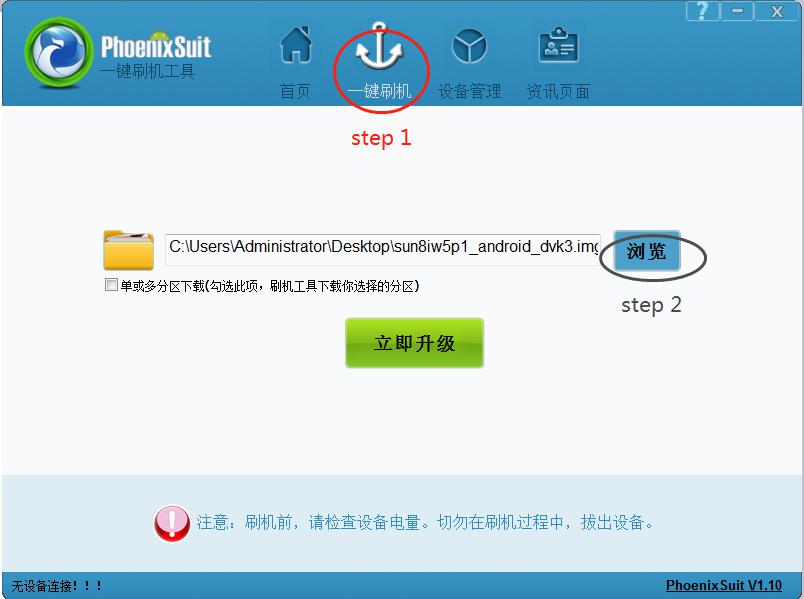
2. Install "PhoenixSuit_CN.msi".  and open the app "PhoenixSuit".
procedure of flashing 518-02

3. Use a USB cable to connect your K518ISE to a computer.
4.
① Click the button in red first.
② Click the button in black next.
procedure of flashing 518-03

③ Find the file procedure of flashing 518-04and click it (marked in red, step 1).
④ Then click the button marked in black (step 2).

procedure of flashing 518-05


5. Hold on the power key and you will see the interface below. Click the
button marked in red. And immediately hold on the volume+ key until
you see a progress bar in the computer.

procedure of flashing 518-05

6. Two windows will pop up, just click YES.
7. Update firmware successfully. Pull out the USB cable and wait for the
device to automatically restore.
8. Don’t touch the device. You will see a white screen and there are two
buttons (set up WIFI and update).
9. Set up WIFI and then update. The problem will be solved after
updating.

http://blog.obd2shop.co.uk/how-to-update-lonsdor-k518ise-firmware-with-free-update-package/

Monday, 22 October 2018

Lonsdor k518ise new update: covers almost all types of cars

Good news!! lonsdor k518ise key programmer newest version released! It covers almost all types of cars and important functions. Please keep reading to find out more.

k518ise Update car list:

k518ise-update-car-list

LUXGEN, 
BAIC, 
BAOJUN, 
YEMA AUTO, 
QOROS, 
JAC, 
ROEWE, 
ZOTYE, 
FAW RED FLAG, 
JMC, 
ZHENGZHOU MAZDA, 
WULING MOTORS, 
SOUEAST MOTORS, 
TIANJIN FAW, 
FAW JIABAO, 
DONGFENG FENGSHEN, 
DONGFENG FENGXING, 
LEOPAARD, 
LANDWIND, 
CHANGAN AUTO, 
SAIC MAXUS, 
HAIMA, 
CHANGHE SUZUK, 
ZHENGZHOU NISSAN, 
HAFEI, 
HUWTAI, 
LIFAN, 
ZX AUTO, 
DONGFENG FENGGUANG, 
FOTON, 
ZD, 
BRILLIANCE AUTO, 
CHANGHE AUTO, 
HANTENG AUTO, 
MERCURY, 
VENUCIA, 
PROTON, 
WEY, 
TRAUM, 
DACIA, 
SKODA, 
BESTURN, 
ROLLS-ROYCE, 
SSANG YONG, 
SMART, 
IVECO, 
Mercedes-Benz, 
ISUZU, 
ALFA ROMEO, 
JAGUAR, 
LANCIA, 
SUBARU, 
TRUMPCHI, 
DS, 
SUZUKI, 
MG, 
LAND ROVER, 
FIAT, 
CADILLAC, 
OPEL, 
VW, 
MITSUBISHI, 
MAZDA, 
RENAULT, 
BUICK, 
PEUGEOT, 
TOYOTA, 
CITROEN, 
CHERY, 
GREAT WALL MOTOR, 
GEELY, 
KIA

k518ise Update car functions list download:


Thursday, 9 August 2018

Lonsdor K518ISE New update: fix bug for Hyundai Toyota Nissan Honda

Good News!! Lonsdor K518ISE can be updated and it has some optimization for Hyundai Toyota Nissan Honda. Please keep reading for more info:

For Toyota:
8A Smart key
2007 Crown key
Alphard add smart key
2006 Reiz
Crown 68 chip all lost

For Hyundai:
2013/2015 Verna remote
2009 Rohens Add smart key
2014 Sonata 8 communication
2014 IX25 smart key all lost

For Honda & Nissan
Honda Accord 9th key
2017 Nissan Teana 4A Transponder

More on car list and feedback:
1. Immo car list
Lonsdor K518ISE Toyota IMMO car list
SeriesOriginYearFuel TypeFunction
CamryOther00-04OtherOrdinary Key(4C)
CamryOtherMay-18OtherOrdinary Key(4D)
ReizOtherOtherOrdinary Key(4D)
CrownOtherOtherOrdinary Key(4D)
HighlanderOtherOtherOrdinary Key(4D)
PradoOther10-OtherSmart Key
CrownOther08-OtherSmart Key
RAV4OtherJan-00OtherSmart Key
ReizOther10-OtherOrdinary Key(4D-G-H-8A)
CorollaOther10-OtherOrdinary Key(4D-G-H-8A)
CamryOtherOct-18OtherOrdinary Key(4D-G-H-8A)
CrownOtherOtherSmart Key
CrownOtherOtherRemote Key
ReizOtherOtherRemote Key
CamryOtherMay-18OtherSmart Key
ReizOther10-OtherRemote Key
CamryOther13-OtherRemote Key
ViosOther13-OtherOrdinary Key(4D)
CorollaOther10-OtherRemote Key
CamryOtherMay-18OtherRemote Key
AVANZAOtherOtherOtherOrdinary Key(4D-G-H-8A)
ViosOther13-OtherOrdinary Key(4D-G-H-8A)
4D-G series lost all keyOtherOtherOtherOrdinary Key(4D-G-H-8A)
HighlanderOtherJan-00OtherOrdinary Key(4D-G-H-8A)
YarisOtherAug-18OtherSmart Key

Lonsdor K518ISE Hyundai IMMO car list
SeriesOriginYearFuel TypeFunction
IX35OtherOtherOtherKey Programming
SonataOtherOtherOtherKey Programming
TucsonOtherOtherPetrol 2.0Key Programming
TucsonOtherOtherDieselKey Programming
TucsonOtherOtherPetrol 2.7Key Programming
MistraOtherOtherOtherKey Programming
ElantraOther08-OtherKey Programming
SonataOtherOtherOtherKey Programming
I30OtherOtherOtherKey Programming
VernaOtherOtherOtherKey Programming
ElantraOrdinary KeyOtherOtherKey Programming
ElantraSmart KeyOtherType 2(With Key Slot K)Smart Key Programming
SonataOtherOtherOtherSmart Key Programming
IX35With Key SlotOtherOtherSmart Key Programming
ElantraOther12-OtherSmart Key Programming
IX35Without Key SlotOtherOtherSmart Key Programming
IX35(F/L)OtherOtherOtherSmart Key Programming
VernaOtherOtherOtherSmart Key Programming
IX25OtherOtherOtherSmart Key Programming
New IX35OtherOtherOtherSmart Key Programming
SonataOther9th GenerationOtherSmart Key Programming
All New SantafeOther13-OtherSmart Key Programming
All New TucsonOtherOtherOtherSmart Key Programming
MistraOtherOtherOtherSmart Key Programming
ATOZKorea1998-2002OtherKey Programming
GETZKorea03-OtherKey Programming
AccentOther2000-2005OtherKey Programming
MatrixKorea06-OtherKey Programming
AvanteKorea2001-2012OtherKey Programming
HD COUPE(Coupe)Korea02-OtherKey Programming
AzeraKorea2006-2010OtherKey Programming
H1Korea1998-2002DieselKey Programming
TRAJET X6Korea2001-2002OtherKey Programming
VELOSTERKorea12-OtherKey Programming
AvanteKorea13-OtherKey Programming
I40Korea12-OtherKey Programming
AzeraKorea11-OtherKey Programming
H1Korea11-OtherKey Programming
VeracruzKorea06-OtherKey Programming
Rohens CoupeKorea09-OtherKey Programming
Rohens (BH)Korea09-OtherKey Programming
EquusKorea2012-2013OtherSmart Key Programming
Rohens CoupeKorea09-OtherSmart Key Programming
I40Korea12-OtherSmart Key Programming
VelosterKorea12-OtherSmart Key Programming
Rohens (BH)Korea13-OtherSmart Key Programming
EquusKorea2009-2011OtherSmart Key Programming
Rohens (BH)Korea09-OtherSmart Key Programming
Rohens (BH)Korea2012OtherSmart Key Programming
VeracruzKorea06-OtherSmart Key Programming
EquusKorea14-OtherSmart Key Programming
All New SantafeOther13-OtherKey Programming
SantafeKorea2001-2002OtherKey Programming
SantafeKorea2009-2012OtherKey Programming
SantafeKorea2006-2008PetrolKey Programming
GRANDSANTAFEKoreaOtherOtherKey Programming
GRANDSANTAFEKoreaOtherOtherSmart Key Programming
AzeraKorea11-OtherSmart Key Programming
SonataOther2005-2014OtherKey Programming
SonataOther2005-2014OtherSmart Key Programming
SantafeKorea2009-2012OtherSmart Key Programming
AccentOther06-OtherKey Programming
SantafeKorea2006-2008DieselKey Programming
ElantraOther12-OtherRemote Key Programming
IX35OtherOtherOtherRemote Key Programming
VernaOtherOtherOtherRemote Key Programming
481All New TucsonOtherOtherRemote Key Programming
SonataOtherOtherOtherRemote Key Programming
Rohens CoupeKorea09-OtherRemote Key Programming
I30OtherOtherOtherRemote Key Programming
All New SantafeOther13-OtherRemote Key Programming
AzeraKorea11-OtherRemote Key Programming
ElantraOtherOtherOtherKey Programming
ElantraOtherOtherOtherRemote Key Programming
TucsonOtherOtherOtherRemote Key Programming
Classified by SystemKey ProgrammingOtherType 1(K)Key Programming
Classified by SystemKey ProgrammingOtherType 2(K)Key Programming
Classified by SystemKey ProgrammingOtherType 3(K)Key Programming
Classified by SystemKey ProgrammingOtherType 4(CAN)Key Programming
Classified by SystemKey ProgrammingOtherType 5(CAN)Key Programming
Classified by SystemSmart Key ProgrammingOtherType 1(With Key Slot K)Smart Key Programming
Classified by SystemSmart Key ProgrammingOtherType 2(With Key Slot K)Smart Key Programming
Classified by SystemSmart Key ProgrammingOtherType 3(Without Key SlotK)Smart Key Programming
Classified by SystemSmart Key ProgrammingOtherType 4(With Key Slot K)Smart Key Programming
Classified by SystemSmart Key ProgrammingOtherType 5(Without Key SlotK)Smart Key Programming
Classified by SystemSmart Key ProgrammingOtherType 6(With Key Slot K)Smart Key Programming
Classified by SystemSmart Key ProgrammingOtherType 7(Without Key SlotCAN)Smart Key Programming
Classified by SystemSmart Key ProgrammingOtherType 8(Without Key SlotCAN)Smart Key Programming
Classified by SystemRemote Key ProgrammingOtherType 1(K)Remote Key Programming
Classified by SystemRemote Key ProgrammingOtherType 2(CAN)Remote Key Programming
Classified by SystemImmobiliser Authorization CodeOtherOtherRead Pin Code
ElantraSmart KeyOtherType 1(Without Key SlotK)Smart Key Programming
Read Pin CodeOtherOtherOtherRead Pin Code
VernaOtherOtherOtherKey Programming
Classified by SystemRemote Key ProgrammingOtherType 3Remote Key Programming
Classified by SystemRemote Key ProgrammingOtherType 4Remote Key Programming
Classified by SystemRemote Key ProgrammingOtherType 5(K)Remote Key Programming

Lonsdor K518ISE Honda IMMO car list
SeriesOriginYearFuel TypeFunction
Classified by SystemOrdinary KeyOtherOtherImmobiliser System 1
Classified by SystemOrdinary KeyOtherOtherImmobiliser System 2
Classified by SystemSmart KeyOtherOtherKnob Type
Classified by SystemSmart KeyOtherOtherButton type
Classified by SystemRemote KeyOtherOther9th generation immobiliser system
Classified by SystemOrdinary KeyOtherOtherImmobiliser System 4
Classified by SystemOrdinary KeyOtherOtherImmobiliser System 3
Classified by SystemOrdinary KeyOtherOtherCheck immobiliser type

Lonsdor K518ISE Nissan IMMO car list
SeriesOriginYearFuel TypeFunction
Classified by SystemOrdinary KeyOtherOtherElectronic key(10)
Classified by SystemOrdinary KeyOtherOtherElectronic key(E0)
Classified by SystemOrdinary KeyOtherOtherElectronic key(12)
Classified by SystemOrdinary KeyOtherOtherAutomatic retrieval type
Classified by SystemRemote keyOtherOtherAutomatic retrieval type
Classified by SystemSmart Key4-digit PIN CodeOtherSmart Key(no key slot - knob type)
Classified by SystemSmart KeyNew 20-digit rolling codeTeana-VIP(13-after)Smart key system 1(rolling code)
Classified by SystemSmart KeyNew 20-digit rolling codeCima(13-after)Smart key system 1(rolling code)
Classified by SystemSmart KeyNew 20-digit rolling codeJX35(13-)Smart key system 1(rolling code)
Classified by SystemSmart KeyNew 20-digit rolling codeQX60(13-)Smart key system 1(rolling code)
Classified by SystemSmart KeyNew 20-digit rolling codeMuranoSmart key system 1(rolling code)
Classified by SystemSmart KeyNew 20-digit rolling codeQ50Smart key system 2(rolling code)
Classified by SystemSmart KeyNew 20-digit rolling codeX-Trail(13-after)Smart key system 3(rolling code)
Classified by SystemSmart KeyNew 20-digit rolling codeQashqai(15-after)Smart key system 3(rolling code)
Classified by SystemSmart Key4-digit PIN CodeOtherSmart Key(no key slot - knob type)
Classified by SystemSmart Key4-digit PIN CodeOtherSmart Key(with key slot - button type)
Classified by SystemSmart Key4-digit PIN CodeOtherSmart Key(without key slot - button type)
Classified by SystemSmart Key4-digit PIN CodeOtherSmart Key(with key slot - button type)
Classified by SystemOrdinary KeyOtherOtherNew 20-digit rolling code
Classified by SystemOrdinary KeyOtherOtherActivate direction lock
Classified by SystemSmart Key4-digit PIN CodeOtherActivate direction lock

2. Feedback
Lonsdor K518ISE Toyota Feedback
Lonsdor K518ISE Hyundai Feedback
Lonsdor K518ISE Honda & Nissan Feedback
http://blog.obd2shop.co.uk/lonsdor-k518ise-key-programmer-feedback-on-what-is-working/

Lonsdor K518ISE after-sale service contact info:
http://www.obd2shop.co.uk/
Skype: obd2tool.co.uk
Email: sales@obd2shop.co.uk
TEL: +86 13983755934

Thursday, 11 January 2018

Lonsdor K518ise Key Programmer Tech Support: Register, Activate, Update & How to use

The post will show you some information: Lonsdor K518ise Key Programmer Tech Support: Register, Activate, Update & How to use.

Lonsdor k518ISE


How to Register Lonsdor K518ISE

After system updating, you need go to registration & activation.
For new user, Click on Registration,
Input: user name(email), name(min 2 char), password(min 6 char), email verification code
Click on “YES”
Lonsdor K518ISE registration completes
(if interrupted after registration is done, you will go to the System update–Registered user to proceed).
Then go to Activation confirmation to continue.

How to Activate Lonsdor K518ISE
After confirming activation, it will go the password Setup interface
set 6-digit numbers as your startup password
information verification by Lonsdor
(5-30 minutes, you can check the progress by clicking “Refresh” )
re-enter the password to verify
get the notification that verification successful
the whole process before using the device is complete.

Pay Attention:

1. User name must be workable email address, so that you can receive the verification codefrom Lonsdor by email.

2. Please pay attention to the difference between the registration password (min 6 char) and the startup password(6-digit), the former will generally only used when registration, so please commit the 6-digit startup password into memory, as this will be required every time when you start the device.

3. The account will be bound to the corresponding device for life, other accounts can not log in your device and your account can not log in an registered or activated device either.

4. An account can be used to bind multiple new devices.

Lonsdor K518ISE Key Programmer Update

Connect to the network

the Lonsdor K518ISE car key programming software system will automatically update to the latest version.

There are 3 ways of system update:

 One key update: quickly update the new added or modified functions.

 APK update: this is used when the APK is updated.

 Force to update: this is used when the device is faulty or to retrieve data.

How to Use Lonsdor K518ISE

Here take the Toyota/Lexus smart key all key lost as example.
1) Binding
   1.Go to the “Bind emulator key” function;
   2.Turn on emulator key and put it into K518ISE key slot (put the status indicator down, make sure the key is active);
   3.Following the system direction and click “OK” to start binding;
   4.After binding completed, the system will indicate “Binding successful”.

Note: The KPROG adapter is specialized for part of Volvo car series and the new Maserati for the time being, we are still developing some more car models that the adaptor can support in the near future, such as Jeep Grand Cherokee, please refer to our website or directly go to the”One key update” for latest news.

2)  Backup EEPROM data
Connect K518ISE with car OBD port, enter into “Backup immodata” to back up the data.

3)  Make emergency emulator key
After choosing the immo data, in a network environment, the system will indicate to choose the corresponding SKE emulator key model, please start the key and put it into K518ISE key slot(make sure the key is activate), follow the instruction to make an emulator key.

4)  Add smart key
Click the car start button, put the generated SKE emulator key close to the start button, with induction the car will automatically activated.
The system will read current key count, then follow the instruction to add key.
Precaution
1.”Bind emulator key” can identify the SKE emulator key binding state;
2.SKE emulator key need to bind K518ISE host and can bind only for one time;
3.When making emulator key, make sure well net connection and to choose the corresponding SKE emulator key model correctly.

K518ise key programmer on sale: http://www.obd2shop.co.uk/wholesale/lonsdor-k518ise-key-programmer.html

2024 Toyota Corolla Add Smart Key with Lonsdor K518 Pro + LT32

This guide covers how to add an LT32 Smart Remote and reprogram the OEM smart key on a 2024 Toyota Corolla using the Lonsdor K518 Pro . Too...