Showing posts with label Lonsdor K518ISE Key Programmer. Show all posts

Monday, 24 October 2022

How to Test Lonsdor K518ISE OBD Cable & Connection Chip?

Problem: I've tried to connect my Lonsdor K518ISE to Land Rover, Ford & Audi, but they all have the same error: "Vehicle connection failed, please check the connection between the device and vehicle OBD."
test-lonsdor-k518ise-obd-cable-connection-chip-1


Possible reasons that may cause the issue:
1. OBD cable is broken;
2. K518 communication chip is damaged.

Test with a new OBD cable to judge if the communication chip can still work normally. To find out if the OBD cable has a problem, we need to test it.

How to test K518 OBD cable?
1. Unplug K518 Key Programmer and turn it off.
2. Connect the OBD cable(DB25 cable) to K518ISE, and switch to the diode stalls with a multimeter.

Pay attention that there are 3 connectors on the OBD cable:
Connector 1: connect K518ISE OBD port;
Connector 2: connect KPROG adaptor;
Connector 3: connect the vehicle OBD port.
test-lonsdor-k518ise-obd-cable-connection-chip-2

3. Touch the metal part(shown in pic) with a red pen.
test-lonsdor-k518ise-obd-cable-connection-chip-3


4. Test the resistance of each pin on the K518 connector with a black pen, making sure the vehicle connector is held in the way as shown.
test-lonsdor-k518ise-obd-cable-connection-chip-4

PIN1,8 should have no resistance;
PIN2,3,4,5,6,7,9,10,11,12,13,14,15,16 should have resistance.

Test Results
If all have no resistance, the OBD cable(DB25 cable) has a problem.
If the measurement is all as it is supposed to be, and the car(K518 supported models) still can't be connected, you'll need to send back the OBD cable(DB25 cable) & K518 device for Lonsdor to check.

Friday, 4 February 2022

Lonsdor K518ISE Program Range Rover Evoque 2018 AKL via OBD

Using Lonsdor K518ISE to successfully program a Range Rover Evoque 2018 via OBD when all keys lost. You’ll need to open the Lonsdor JLR license firstly. This vehicle is normally very difficult to program. But with K518ISE key programmer, it becomes an incredibly easy way in minutes. No EEPROM, no disassembly.


The JLR License is now available to program Lon


sdor 2018-2021 JLR Key as well.

FAQs refer to:

http://blog.obd2shop.co.uk/lonsdor-jlr-2018-2021-smart-key-new-in-stockfaq/


In this case, you may need a Lonsdor 2015-2018 JLR Specific Key.


lonsdor-k518ise-program-range-rover-evoque-2018-akl-via-obd-1


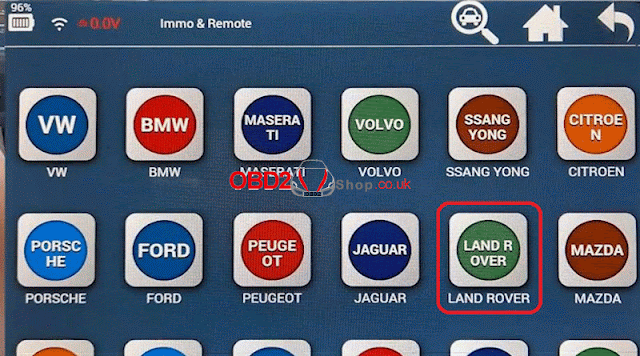
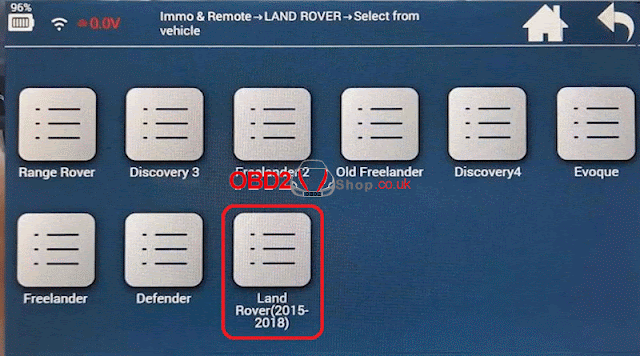
Connect K518 programmer with OBD, go into

Immo & Remote >> LAND ROVER >> Select from vehicle >> Land Rover(2015-2018) >> Smart key

*Here’s allowed to select 4 types:

Type 1(FK72)

Type 2(HPLA)

Type 3(write-to-start)

Type 4(program by OBD)


If programming FK72 or HPLA version via OBD, Lonsdor JLR Connector will be in need. Here we just select type 4.

lonsdor-k518ise-program-range-rover-evoque-2018-akl-via-obd-2

lonsdor-k518ise-program-range-rover-evoque-2018-akl-via-obd-3

lonsdor-k518ise-program-range-rover-evoque-2018-akl-via-obd-4

lonsdor-k518ise-program-range-rover-evoque-2018-akl-via-obd-5


Type 4(program by OBD) >> All smart key lost


Choosing all key lost will delete the original key from system.

New key only supports Lonsdor dedicated key.

Be sure before selecting.


JLR software update works for both FK75 and HPLA versions of KVM system.

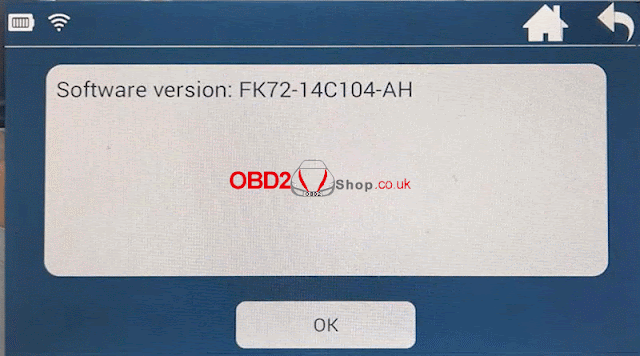
Software version: FK72-14C104-AH

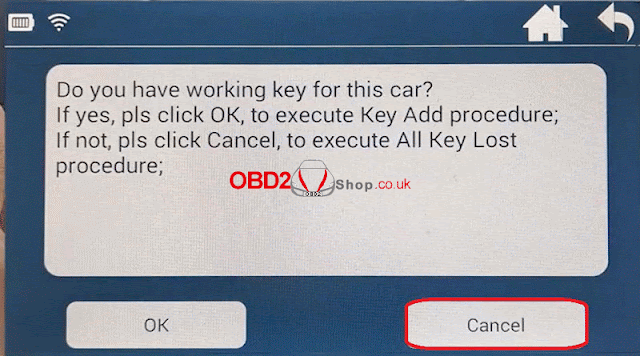
Do you have working key for this car?

Select “Cancel” for AKL.


lonsdor-k518ise-program-range-rover-evoque-2018-akl-via-obd-6

lonsdor-k518ise-program-range-rover-evoque-2018-akl-via-obd-7

lonsdor-k518ise-program-range-rover-evoque-2018-akl-via-obd-8

lonsdor-k518ise-program-range-rover-evoque-2018-akl-via-obd-9


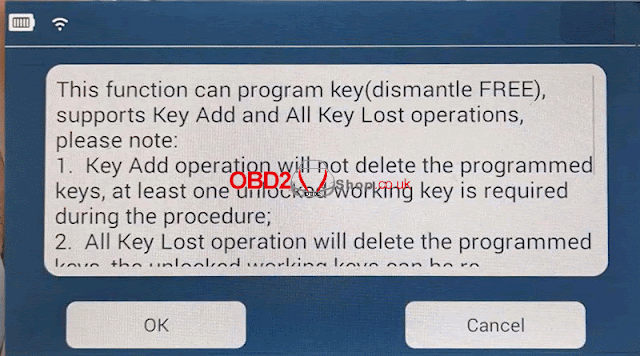
Note: AKL operation will delete all the programmed keys, the unlocked working key can be re-programmed on current vehicle. For the locked working key, please make sure it can be unlocked before programming. Otherwise, it will be deleted.


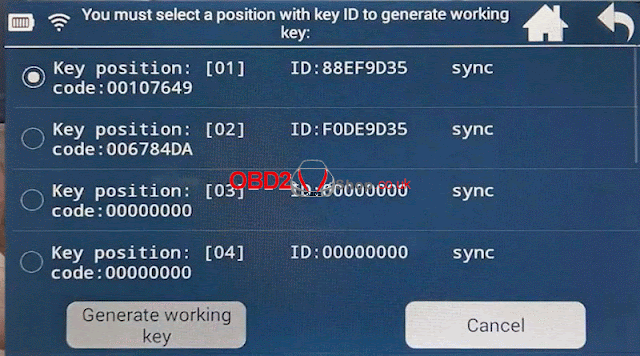
Select an key position with ID, press “Generate working key”.

Put the new key into K518 card slot.

Select key type: 1. Lonsdor dedicated key for Jaguar Land Rover.


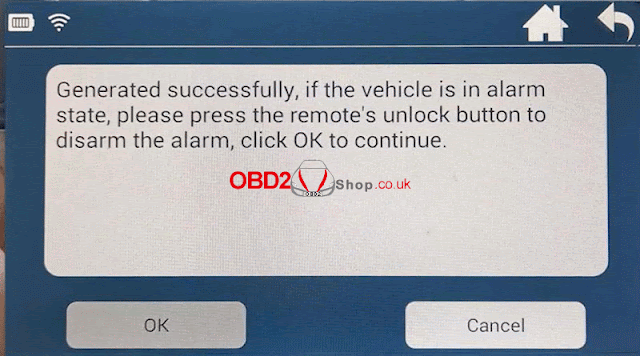
Generated successfully.

If the vehicle is in alarm state, please press the remote’s UNLOCK button to disarm the alarm.

lonsdor-k518ise-program-range-rover-evoque-2018-akl-via-obd-10

lonsdor-k518ise-program-range-rover-evoque-2018-akl-via-obd-11

lonsdor-k518ise-program-range-rover-evoque-2018-akl-via-obd-12

lonsdor-k518ise-program-range-rover-evoque-2018-akl-via-obd-13


Test the key.

Key works great, we got a working key now.

Done!


I can’t think of a way that could have been any easier. K518 Programmer took me just a few minutes to reprogram this 2018 Range Rover. No need to do any kinds of EEPROM or take any computers out. No risk of breaking the system.


Tuesday, 20 April 2021

How to do Formatting for Lonsdor K518ISE Key Programmer?

Sometimes, Lonsdor K518ISE Key Programmer may meet some problems to crash, or stop working. You’ll need to format the device.


How to format Lonsdor K518ISE?

Step1. Hold 2 buttons marked in red meanwhile, you’ll go into the interface as below.

do-formatting-for-lonsdor-k518ise-key-programmer-1

Step2. Press “Arrow Button”>>“Factory Setting”. 

do-formatting-for-lonsdor-k518ise-key-programmer-2

The device will show a prompt warning: “This operation will clear apk related data and reinstall, please operate carefully!!!”. 

Press “OK”.

do-formatting-for-lonsdor-k518ise-key-programmer-3

Step3. Press “Repair”>>“Oldest APK”, wait APK installing until completed, press “Return”.

do-formatting-for-lonsdor-k518ise-key-programmer-4

do-formatting-for-lonsdor-k518ise-key-programmer-5

do-formatting-for-lonsdor-k518ise-key-programmer-6

do-formatting-for-lonsdor-k518ise-key-programmer-7

Step4. Press “Start APK”, and connect the device with WIFI. 


Press “Update”>>“OK” to update.

do-formatting-for-lonsdor-k518ise-key-programmer-8

do-formatting-for-lonsdor-k518ise-key-programmer-9

do-formatting-for-lonsdor-k518ise-key-programmer-10

Thus, you can use the K518ISE programmer normally again after updating.


This is the procedure of formatting Lonsdor K518ISE step by step.

https://www.obd2shop.co.uk/


Tuesday, 6 April 2021

Lonsdor K518ISE Program a Key for BMW Mini Cooper CAS3

Lonsdor K518ISE Key Programmer can add a key for BMW Mini Cooper CAS3 successfully.


Prepare an original key & a blank key.

Key frequency: 315MHZ


Backup CAS Key Data

Connect Lonsdor K518ISE scanner with OBD, press

Immobilization >> BMW >> Select from type >> CAS1/CAS2/CAS3 >> Backup & recover 


This function allows restoring and backup CAS key data, 

1. Please carry out this before key programming

2. When key programming causes CAS to lock, you can use the previously saved key data to reset CAS.

Press “OK” to continue.


Please click the START button once, press “OK”.

lonsdor-k518ise-program-a-key-for-bmw-mini-cooper-cas3-1

lonsdor-k518ise-program-a-key-for-bmw-mini-cooper-cas3-2

lonsdor-k518ise-program-a-key-for-bmw-mini-cooper-cas3-3

Confirm system information, press

OK >>OK


Reading RAM...


Remove original key from the ignition switch. For smart key, take it outside car.

Press “OK”.


Select “Backup key data”, press “OK”.

lonsdor-k518ise-program-a-key-for-bmw-mini-cooper-cas3-4

lonsdor-k518ise-program-a-key-for-bmw-mini-cooper-cas3-5

lonsdor-k518ise-program-a-key-for-bmw-mini-cooper-cas3-6

lonsdor-k518ise-program-a-key-for-bmw-mini-cooper-cas3-7

Rename >> OK >> OK >> OK


Complete.


Make Dealer Key

Program/delete key >> OK 


Click START button once, press “OK”.


OK >> OK


Remove key from ignition switch. For smart key, take it outside car.

Press “OK”.


Select one “Enable key position”, press “Generate key”.

lonsdor-k518ise-program-a-key-for-bmw-mini-cooper-cas3-8

lonsdor-k518ise-program-a-key-for-bmw-mini-cooper-cas3-9

lonsdor-k518ise-program-a-key-for-bmw-mini-cooper-cas3-10


Select “Original ignition coil is generated”. Press “OK”.

Note: if the key is an original key, please use pre-process first. If the key has been programmed but failed, please do key unlocking and CAS key data restoring first.

Press “OK”.


Select “Remote key”, press “OK”.


Pull the K518 key slot to the right and insert the new key (to identify if the key is legal and to pre/process key).

The current key is legal, press OK >> OK

lonsdor-k518ise-program-a-key-for-bmw-mini-cooper-cas3-11

lonsdor-k518ise-program-a-key-for-bmw-mini-cooper-cas3-12

lonsdor-k518ise-program-a-key-for-bmw-mini-cooper-cas3-13


Please insert new blank key into car slot, press “OK”.


Writing key information...


If for remote or smart key, please complete the following steps:

1. Take away the key from ignition switch.

2. Re-insert key into ignition switch.

3. Press START button.

Press “OK”.


If vehicle can not be started, or direction lock shows on the dashboard, please synch ELV or DME accordingly. Press “OK”.


Writing key info complete, press “OK”.


Let’s test the new key, alright, it can work well.

Key programming has done!

lonsdor-k518ise-program-a-key-for-bmw-mini-cooper-cas3-14

lonsdor-k518ise-program-a-key-for-bmw-mini-cooper-cas3-15

lonsdor-k518ise-program-a-key-for-bmw-mini-cooper-cas3-16

This is how to use Lonsdor K518ISE to program a key for BMW Mini Cooper CAS3 step by step.

https://www.obd2shop.co.uk/


Wednesday, 19 December 2018

Lonsdor K518ISE firmware update package update and how to update?

Dear Lonsdor K518ISE users, just follow the next steps to download the firmware update package and follow the procedure to update the firmware. It is provided by Lonsdor Engineer so you don't need to worry it won't work.

Step 1. Download free Lonsdor K518ISE firmware update package
URL: https://mega.nz/#!ZYIg1CbJ!HCAZJTPbtJ3VY3X51eJt42a_673-MT8xQq61Qvl17K8

Step 2. How to use:
1. Download and unzip the attached file, you will get

lonsdor-k518ise-flashing-package-01

2. Install "PhoenixSuit_CN.msi".  and open the app "PhoenixSuit".
procedure of flashing 518-02

3. Use a USB cable to connect your K518ISE to a computer.
4.
① Click the button in red first.
② Click the button in black next.
procedure of flashing 518-03

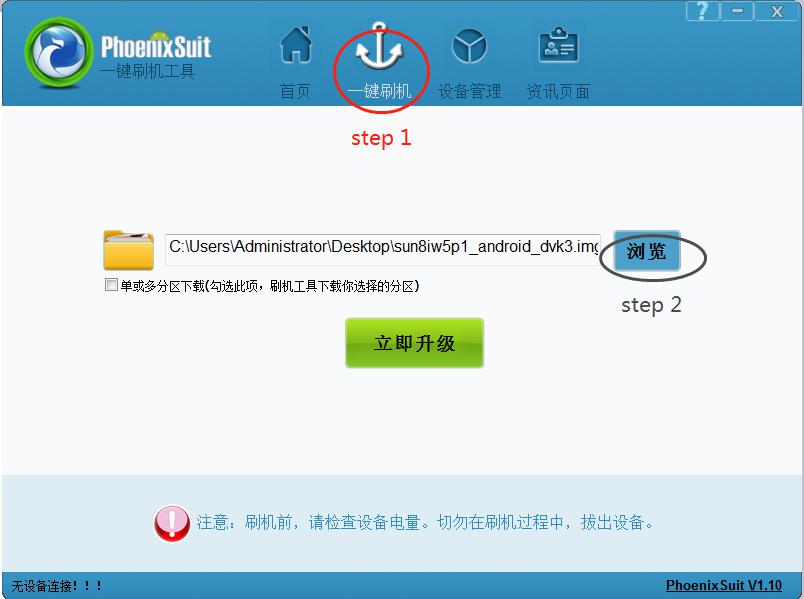
③ Find the file procedure of flashing 518-04and click it (marked in red, step 1).
④ Then click the button marked in black (step 2).

procedure of flashing 518-05


5. Hold on the power key and you will see the interface below. Click the
button marked in red. And immediately hold on the volume+ key until
you see a progress bar in the computer.

procedure of flashing 518-05

6. Two windows will pop up, just click YES.
7. Update firmware successfully. Pull out the USB cable and wait for the
device to automatically restore.
8. Don’t touch the device. You will see a white screen and there are two
buttons (set up WIFI and update).
9. Set up WIFI and then update. The problem will be solved after
updating.

http://blog.obd2shop.co.uk/how-to-update-lonsdor-k518ise-firmware-with-free-update-package/

Wednesday, 5 December 2018

Lonsdor K518ISE Key programmer Test Results: after 90 days free trial update

Lonsdor K518ISE Key programmer is tested by users 95.5% working fine after 90 days free trial update, it can work fine on an increasing number of car models. Here list some.
lonsdor-k518se-key-programmer-3


1. New 3 month trial period for certain special function.

I used it for Megane 3 with Smart Card system. The programmed key card in 2 minutes. No need pin code or anything...
Seems they have finally got a good competition for the Zedfull.....

2. Mégane 3 RS 2010, 4 buttons card, hands-free. Cards programmed 2 mins, Starts/stops, opens/closes, and the hands-free works too with factory cards

3. Fiat Doblo 2017. Program key ok And disabled key lost
Honda Accord 2012. Add key ok

4. Renault master3 2012 add key ok

5. BMW 1 F25 2012 fem add Key ok

6. Read pin add key Peugeot 208 2014 ok

7. Mazda cx9 2015 add key 4d-63 80bit ok

8. -Renault espace 2008 added 2 smart cards with no error, after finished the 2 cards were not recognized did not start car or work central locking

took long while, 5 minutes per card, MVP coded all cards in under 30 seconds, working perfectly...

9. - I made cas 2 one week ago no problem at all i made key in slot off lonsdor max 5 min

10. -Personally I never had issue with BMW cas 2/3 with lonsdor

11. - Volvo v50 2005 add key and remote ok

12. -Good news !! New update is good for MQB key !! Work fine add key on golf mk7 2015 ! Very fast and easy !!! Bravo !!

13. Mitsubishi space wagon 2003, precoded id61 and programmed key ok.

14. Corsa E (2016) read PIN (BCM) = OK

16. VW Amarok 2016 add key ok and backup EEPROM

17. FIAT 500 2008 Read Pin code and prepare remote key than program. ALL FINE

18. I have start loving this toy when i bought it was working 20% ok 80% not Now it is 95 - 5. Today megane 3 year 2009 keyless key made job in 2minutes

19. Porche Panamera 2010 km adjust obd job done

20. hyunday i20 2015 year
read pin ok
add key ok

21. Citroën c5 2008 read pin add key ok
307 Kline read pin fail/add key ok

22. 206 kline all key lost read pin ok about 3sec
23. Opel Zafira b read pin add key
24. Touran 2006 learn key and remote ok

25. Zafira B, read pin and add key, - Success (note, this failed under Zafira B in menu, but i chose type 3 from by system for both pin read and program and works fine)

26. Peugeot 607 2006 abrites won't connect with BSI to read pin and key learning too.
Lonsdor read pin and program key 2 min.

27. Renault Fluence 2015 keyless go works excellent, in fact, zed full asks for pin and Lonsdor doesn't. The key works ok in central module and keyless go,5 min job.

28. Suzuki Swift 2015-> (pcf7961)
all key lost
Program without pin - OK (2min)

29. Ford focus 2006 year
add key (all key lost) work all ok

30. Suzuki Swift 2013 all key lost - OK

31. Ford kuga smart spare key....ok, max 5min job

32. i30 2009 all key lost pin i key(7936) ok

33. grand Cherokee 2014 add smart ok

34. Lonsdor K518 Jeep Grand Cherokee 2015 Smart Key programming definetely. Read eeprom, calculate pin code OK.

35. Berlingo 2014 all key lost pin read ok

36. Fiesta 2013 keyless ok

37. Mazda 3 2014 add Smart key OK. All keys lost also OK.
I20 2014, read pin without working key and program key OK.

38. 2012 Ford Transit T350 2.2 RWD

AKL ok

Add Keys ok

39. Today Megane 3 year 2009 keyless key made job in 2 minutes.

Lonsdor K518ISE Key programmer FAQ:
Q: hmmm, i suppose i should update, seems like some new features are cropping up,
A: You need update and activate trial version for show new functions for 90 days. If you not activate trial version news functions not visible.

Q: What does trial for 90 data means?
A: for coverage in red color, after 90 days if you want still to use that coverage it will be paid option

Information about subscription update for a year: 600$

I'm planning to buy, but now this will be ban.

Q: Bmw X5 cas3+ the year 2008 add key not successful read ok all , but was not able to add key , ZedFull add in 1 min .
A: you must add it with key in ignition, in slot doesn't work ok, but with key in ignition should work. tested by me

http://blog.obd2shop.co.uk/lonsdor-k518ise-key-programmer-test-results-after-90-days-free-trial-update/

2024 Toyota Corolla Add Smart Key with Lonsdor K518 Pro + LT32

This guide covers how to add an LT32 Smart Remote and reprogram the OEM smart key on a 2024 Toyota Corolla using the Lonsdor K518 Pro . Too...