Wednesday, 28 October 2020

Autel IM508 vs. Lonsdor K518ISE vs. Xtool X100 PAD2

Autel MaxiIMIM508 vs. Lonsdor K518ISE vs. Xtool X100 PAD2 are the most asked frequently key programmers in OBD2shop under £1,300. What is the difference between them? How can I choose?

Today we will make a comparison as below:

Item

Autel MaxiIM IM508

Lonsdor K518ISE

Xtool X100 Pad2

Image

autel im508
lonsdor k518ise
xtool x100 pad2

Price

£1,229

£919

£568

CPU

Cortex-A9 processor, 1.6 GHz

ARM Cortex-A7 Quad-core Processor Speed 1.34GHZ

Quad Core, 1.6 GHz

Memory

32GB

eMMC 8G RAM 1G Comm port USB2.0-type B

1GB RAM, 16GB Flash

Battery

3.7V/5000 mAh

3800 mAh

4000mAh, 7.4V

FUNCTION LIST


All System Diagnostics

√


4 System Diagnosis

Read/Erase Codes

√


√

View/Record/Playback Live Data

√


View Freeze Frame Data

√


Shop And Data Manager Applications

√


Key Read/Write

√

√

√

EEPROM Chip Read

√

√

√

Key Programming

√

√

√

Key Learning

√

√

√

All Key Lost

√

√

√

Remote Controller

√

√

√

Backup/Restore Immo Data

√

√

√

Immo Ecu Reset/Adaptation

√

√ (a little part car makes)

√ (a little part car makes)

Immo Ecu Refresh/Coding

√


Immobilization

√

√

√

Oil Reset

√


√

Odometer Adjustment

√

√ (a little part car makes)

√

ETCS

√


EPB

√


√

SAS

√


TPMS

√


Tire pressure warning light reset

BMS

√


√

DPF

√


√

Steering Angle Sensor Relearn

√


Steering Angle Calibration

language

English, French, German, Dutch, Polish, Swedish, Korean, Japanese, Russian, Italian and Traditional Chinese.

English

English, Spanish, French, Turkish, Indonesian, Thai, Portuguese.


Vehicle Coverage

Autel MaxiIM IM508

Lonsdor K518ISE

Xtool X100 Pad2
America: Buick, Cadillac, Chevrolet, Dodge, GM, GMC, Hummer, Pontiac, Saturn, Ford.
Asia: Acura, Honda, Hyundai, Infiniti, Isuzu, KIA, Lexus, Mazda, Mitsubishi, Nissan, Ssangyong, Subaru, Suzuki, Toyota.
China: BYD, Great Wall Motor, Brilliance, JAC, Geely Cars, Lifan Cars, Chery.
Europe: Audi, Benz, Citroen, Ford, Fiat, Jaguar, Lancia, Land Rover, Opel, Peugeot, Porsche, Renault, Romeo, Seat, Skoda, Smart, VW.

Conclusion
K518ISE can program keys for a wide range of cars, including the new cars' smart keys & mechanical keys without networking.

IM 508 supports full system diagnosis, key programming, odometer adjustment, and special functions, which is a necessary tool for large car repair shops or professional mechanics. IM508 can work with the XP400 Pro adapter to realize reading & writing ECU, IC card, MC9S12 functions.

X100 PAD2 is a tablet with the latest technology, it not only provides professional key programming but also provides the most needed special functions for workshops (oil reset/engine oil light reset, tire pressure warning light reset, EPB reset, TPS throttle body adaptation, DPF reset, etc.)

Have you made a decision yet? Only to follow your requirements.
More car diagnostic devices please refer to our web:


Tuesday, 8 September 2020

Lonsdor K518S vs. AUTEL IM608 (based on reviews)

2020 Lonsdor K518S IS SIMPLY AN MONSTER TOOL, AUTEL IM608 it’s just a server not a key tool without the internet ! In LONSDOR you have KEY FUNCTION of: VVDI2 VAG im4/5 MQB BMW + R.E.T + SMOK + TM.PRO.2 + I/O Terminal + TrueCode + OBDSTAR DP+ for £300 / year

Easy can replace £6000-10 000 of one brand tool, Autel beat it only on MQB AKL & Benz key.


Question:

little nuts tho comparing to TMPro2. Specialist tool


Wonder how good Lonsdor K518S really is. I’ll buy it n test myself.


Answer:

2015 Fiat 500 made RF dealer key = 2 seconds !!!!

2011 Giulietta made RF dealer key = 2 seconds !!!!


like you i don’t understand why this £900 tool be better faster than my £900 I/O terminal on new B.S.I, i buy it just 10 day ago!


worth the money IMO, comes in a bag so is very easy to get out built-in key programmer and offline.


To be updating…


http://blog.obd2shop.co.uk/lonsdor-k518s-vs-autel-im608-based-on-reviews/

Thursday, 11 June 2020

Quick Steps to Unlock Smart Keys for FT Toyota/Lexus

"Oops! The key can't be used now. " Wondering if you encountered such a situation before? You wasted a car blank key due to improper operation during Toyota key programming. Here is a quick way to unlock FT Toyota/Lexus smart keys, so that you can reutilize it and save money.

Step 1:
Press and hold button 1, 2, and 3 at the same time.


Step 2:
When the indicator light is on, keep button 1 and 2 still, and release button 3. After the indicator light goes off, press button 3 again.


Step 3:
Repeat step 2 about 10 times until the indicator light flashes continuously, then release all 3 buttons.


Step 4:
When the indicator light stops flashing, the FT key is successfully unlocked.


Now you can restart the key programming for your Toyota car again! Enjoy.

In conclusion:

Here's a useful and powerful tool I strongly recommend for car key programming: Lonsdor K518 programmer, which can be used with FT Series Smart Key for Toyota/Lexus. Check more details via the link below:
https://www.obd2shop.co.uk/wholesale/lonsdor-k518ise-key-programmer.html

Tuesday, 26 May 2020

Lonsdor K518 Update! Read PIN Code Offline for More GMs

Breaking news! Released just on May 25th, 2020, the latest upgraded Lonsdor K518ISE key programmer now can read PIN code offline for more cars made by Buick, Chevrolet, and Cadillac.

Lonsdor k518 update car list is as below:

Buick:
Verano 2019
Excelle 2018-2019
Lacrosse 2019-2020

Chevrolet:
Cruze 2019
Equinox 2019
Traiblazer 2019
Malibu XL 2019

Cadillac:
XT4 2019
XT5 2019
CT6 2019

k518-update


K518ise programmer supports various car models from Asia, Europe, America, etc. Check the full car list via Lonsdor official website: http://en.lonsdor.com/html/function
https://www.obd2shop.co.uk/wholesale/lonsdor-k518ise-key-programmer.html

Wednesday, 29 April 2020

Lonsdor KH100 remote generation and smart key generation support car list

Lonsdor KH100 is a powerful Remote key programmer that supports functions like identify & copy chip, access control key, simulate chip, generate chip, generate remote (key), generate a smart key(card), detect remote frequency, etc.

lonsdor-kh100-programmer-01
KH100 remote generation and smart key generation support car list:

lonsdor-kh100-programmer-02

1. KH100 Generate Remote key support car list:

lonsdor-kh100-programmer-03

lonsdor-kh100-programmer-04

lonsdor-kh100-programmer-05

lonsdor-kh100-programmer-06

lonsdor-kh100-programmer-07
More list please check Lonsdor KH100 General Remote Generation List.pdf

2. KH100 Generate Smart key support car list:
lonsdor-kh100-programmer-08

More list please check Lonsdor KH100 Smart Remote Generation List.pdf

That’s all.

Thank you!

http://blog.obd2shop.co.uk/lonsdor-kh100-remote-generation-and-smart-key-generation-support-car-list/

How to fix Lonsdor KH100 “Unable to connect to the network” and “Stuck in some interface” error

When “Unable to connect to the network” and “Stuck in some interface” problems occur while using Lonsdor KH100, how to solve it? Please continue reading to find out the answer.

Error 1: Cannot connect to the network even if there are several hot spots available.
Error 2: Stuck in some interface for a long time while operating.
For example, when you register the device, it just keeps searching for network.
When you turn on the device, it keeps loading for several minutes.

Solutions:
Step 1: Download the repaired file of KH100 and put the file on the desktop of a computer.
Unzip the file and you will get two files.

lonsdor-kh100-01

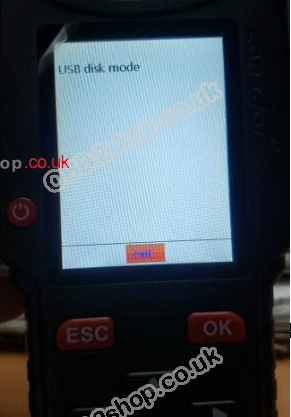
Step 2: Turn off the device. Hold the “Down” button for a few seconds and then press the “Power” button once, the device will enter the “USB Disk Mode” interface.
lonsdor-kh100-02

lonsdor-kh100-03

Step 3: Connect the device to the computer and put those two files into the device.
Step 4: Click “OK” to reboot the device and you will see a progress bar in the device. The device will be updated automatically.

lonsdor-kh100-04
Step 5: Check whether the device works or not after updating.

Thursday, 12 December 2019

No Lonsdor k518 or KH100, how to unlock FT01 smart key manually?

Lonsdor announcement:
There is unlock function of FT01 in Lonsdor KH100 now. and we will release this function to k518 recently. for those who have kh100 or Lonsdor k518, they can unlock ft01 in the device. for those who don't have Lonsdor kh100 or k518, they can unlock ft01 manually according to the instruction below.

How to Unlock Lonsdor FT01 smart key?
The concept of unlocking: Toyota smart key, once been programmed to a car, it cannot be programmed to another car, unless been unlocked.

Unlock steps:
 1. First press and hold the 1, 2, and 3 buttons at the same time (according to the order shown in the following figure), after the indicator is on, release the 3rd button.
2. Keep pressing the 1st and 2nd buttons. After the light is off, press the 3rd button again. Then the light is on and releases the 3rd button.
3. Repeat the second step 10 times or more until the indicator light flashes continuously, then you can release 3 buttons.
4. After the indicator light stops, the smart card is unlocked and can be used as a new card.
5. If you do not understand the above steps, you can refer to the attached video
https://youtu.be/W_3HjcDcCNA

How to Unlock Lonsdor FT01 smart key-01

Image: this is Lonsdor FT01 Series Toyota Smart Key 0020

How to Convert FT01 Key Type? 
Function of Converting FT01 Key Type: support converting the function of the third key on FT01/FT02 in default factory-fresh condition. Support switching the third key to trunk/tailgate.

Procedure:
1. Remove the button battery of the smart key

2. Enter "Special Features" → "FT01" → "Key Type Conversion" option. This option supports converting the third key into car type (trunk) or SUV type (tailgate).

3. Select corresponding vehicle type option and operate according to prompts

4. If the device shows "convert chip failed" during the process, probably the device doesn’t identify the chip. Please change inductive positions (horizontal, vertical or on the side) of the chipboard, then press "execute" and operate again until the device shows "convert chip success".
5. During the process, the device will show "please remove FT01 battery and reinsert", please make sure the battery in the smart key has been taken away and press "ok".The process is finished when the device shows "convert chip success".

Remark:
For those smart keys version under V02.53, have to remove the battery to convert successfully.

For that version higher than V02.53, to remove the battery or not doesn’t have any influence to the process.

How to Update the FT01 Program? 
Enter "Special Features" → "FT01" → "Get Version Information" option to get version information of Toyota smart keys.

For those keys version under V02.53, update the program in "Special Features" → "FT01" → "Update Program" option.

For those versions higher than V02.53, no need to update the program.

Thanks.

http://blog.obd2shop.co.uk/lonsdor-k518-adds-ft01-toyota-smart-key-unlock-function/

Lonsdor JL30-01: Program 2022 Jaguar XEL AKL with K518 PRO

Meet the LONSDOR JL30-01 and JL30-11 , new smart key solutions for Jaguar and Land Rover, covering pre-2018 and 2018+ models with direct da...