Friday, 17 March 2023

How to use Lonsdor LT20-04NJ 8A+4D Toyota & Lexus Smart Key

This article will simply show you how to use Lonsdor LT20-04NJ 8A+4D Toyota & Lexus smart key, and a k518ise key programmer will be used here.


Turn on K518, click "Push function", then select "Special functions" >> "Key settings" >> "LT smart key".

Then we click "Get Version Info" to view the information of this smart key.

how-to-use-lonsdor-lt20-04nj-smart-key-1

how-to-use-lonsdor-lt20-04nj-smart-key-2

Please place the smart key horizontally on the card slot, and click "OK" to continue.

how-to-use-lonsdor-lt20-04nj-smart-key-3

The following picture is the key information.
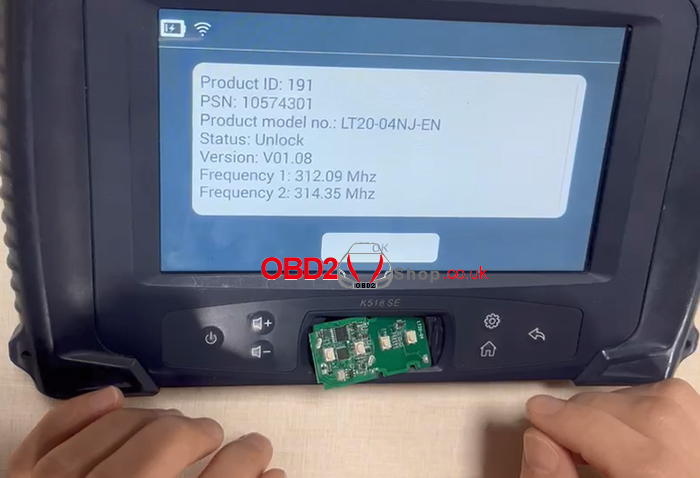
how-to-use-lonsdor-lt20-04nj-smart-key-4

Next, we choose the "Convert smart key type" function to test.

how-to-use-lonsdor-lt20-04nj-smart-key-5

Follow the prompts to insert the smart key into the card slot.

This feature requires an internet connection.

Note: During the key reading process, the error message "Failed to obtain key data" may appear. Try adjusting the Smart Key position more.

how-to-use-lonsdor-lt20-04nj-smart-key-6

The smart key type has "8A" and "4D" to choose from, here we choose "Generate 8A".

how-to-use-lonsdor-lt20-04nj-smart-key-7

Select "2110 (P4: 00 00 A8 A8)".

how-to-use-lonsdor-lt20-04nj-smart-key-8

Select the PKE frequency and convert the button type to complete the test of this function.

how-to-use-lonsdor-lt20-04nj-smart-key-9

how-to-use-lonsdor-lt20-04nj-smart-key-10

For more information about Lonsdor LT20-04NJ Smart Key, please check https://www.obd2shop.co.uk/wholesale/lonsdor-lt20-8a-4d-smart-key-pcb-for-toyota-lexus.html

Sunday, 26 February 2023

How to fix Lonsdor KH110+ can't identify the key?

Customer question: I bought the Lonsdor FT02 PH0440B key, but the following error occurred when I used the Lonsdor KH110+ to identify it. what should I do?

lonsdor-kh110-cant-identify-the-key-01


Technician's response:

Perform the following steps first to get the information on the key.


Select "Special Function" >> "FT Smart Key" >> "8A type" >> "Get version info"

lonsdor-kh110-cant-identify-the-key-02

lonsdor-kh110-cant-identify-the-key-03

If the key information can be obtained normally, please update the key and KH100+ device, then try to identify it.


Here are the steps to update the key:


Select "Special Function" >> "FT Smart Key" >> "8A type" >> "Upgrade SmartKey".

lonsdor-kh110-cant-identify-the-key-04

lonsdor-kh110-cant-identify-the-key-05

For more technical services, please follow http://blog.obd2shop.co.uk/


Wednesday, 8 February 2023

K518 Software update: New Function for AKL of Toyota/Lexus by OBD data back-up

Good news!!! Lonsdor updated the latest software, and the Toyota AKL Online Calculation software license added the OBD function!!!

What does this mean? It means that customers who purchase this software can use this function for free!!

lonsdor-k518-software-update-01

lonsdor-k518-software-update-02

But if you have Lonsdor ADP 8A/4A adapter, you don't need to buy this software license, their functions are the same.


The difference between them:


1. ADP 8A/4A adapter is hardware, and Toyota AKL online calculation is software.

lonsdor-k518-software-update-03

2. Different ways to do Toyota All Key Lost

For K518 + ADP, the smart box needs to be removed, which takes a lot of time and work.

For K518 + Toyota AKL Software, no need to remove the smart box, saving effort and time.

3. Expiration date

ADP can be used for life after purchase (provided the product is not damaged).

Toyota AKL software package is only valid for one year after activation, if you want to continue using it in the second year, you need to reactivate it.


Thursday, 2 February 2023

Fixed: Lonsdor KH100+ Can't Identify PH0440B "No chip detected"

Problem: The Lonsdor KH100+ is unable to identify PH0440B Smart Key, it says: "No chip detected, probably it's placed improperly". It keeps failing even I take off its key shell and try different positions. 


What should I do, any ideas?

fixed-lonsdor-kh100-cannot-identify-ph0440b-1

Solution

Try the steps if the indicator can flash when pressing a key button.

1.Try the menu to check if KH100+ can read key info: Special functions >> FT Smart Key >> 8A type >> Get version info;

fixed-lonsdor-kh100-cannot-identify-ph0440b-2

fixed-lonsdor-kh100-cannot-identify-ph0440b-3

fixed-lonsdor-kh100-cannot-identify-ph0440b-4

fixed-lonsdor-kh100-cannot-identify-ph0440b-5

2. Upgrade Lonsdor KH100 Plus programmer;

3. Upgrade PH0440B key: Special functions >> FT Smart Key >> 8A type >> Upgrade Smart Key 

fixed-lonsdor-kh100-cannot-identify-ph0440b-6

Now you can go back "Identify and copy" menu to try again.

The problem can be solved.


Technical Support

www.obd2shop.co.uk

Wednesday, 21 December 2022

Question: Can Lonsdor K518ISE support adding the 2017 Toyota RAV4 Hybrid smart key? Can you show me how to do it?


Answer

Yes. Lonsdor K518 supported.


Method 1.

Plug ADP 8A/4A Adapter into a smart box to backup data, then add smart keys. 

Path: Immo & remote >> Toyota >> Select from type >> All smart key lost(2016-) >> 8A

lonsdor-k518ise-adds-2017-toyota-rav4-hybrid-key-1

Read also:

Lonsdor K518ISE + ADP Adapter Program 2021 Toyota RAV4 AKL


Method 2.

Generate smart key with Lonsdor FT PCB. 

Special functions >> Key settings >> FT smart key >> 8A >> Generate smart key

lonsdor-k518ise-adds-2017-toyota-rav4-hybrid-key-2

Either way can do the job.

Good luck.


www.obd2shop.co.uk


Monday, 24 October 2022

How to Test Lonsdor K518ISE OBD Cable & Connection Chip?

Problem: I've tried to connect my Lonsdor K518ISE to Land Rover, Ford & Audi, but they all have the same error: "Vehicle connection failed, please check the connection between the device and vehicle OBD."
test-lonsdor-k518ise-obd-cable-connection-chip-1


Possible reasons that may cause the issue:
1. OBD cable is broken;
2. K518 communication chip is damaged.

Test with a new OBD cable to judge if the communication chip can still work normally. To find out if the OBD cable has a problem, we need to test it.

How to test K518 OBD cable?
1. Unplug K518 Key Programmer and turn it off.
2. Connect the OBD cable(DB25 cable) to K518ISE, and switch to the diode stalls with a multimeter.

Pay attention that there are 3 connectors on the OBD cable:
Connector 1: connect K518ISE OBD port;
Connector 2: connect KPROG adaptor;
Connector 3: connect the vehicle OBD port.
test-lonsdor-k518ise-obd-cable-connection-chip-2

3. Touch the metal part(shown in pic) with a red pen.
test-lonsdor-k518ise-obd-cable-connection-chip-3


4. Test the resistance of each pin on the K518 connector with a black pen, making sure the vehicle connector is held in the way as shown.
test-lonsdor-k518ise-obd-cable-connection-chip-4

PIN1,8 should have no resistance;
PIN2,3,4,5,6,7,9,10,11,12,13,14,15,16 should have resistance.

Test Results
If all have no resistance, the OBD cable(DB25 cable) has a problem.
If the measurement is all as it is supposed to be, and the car(K518 supported models) still can't be connected, you'll need to send back the OBD cable(DB25 cable) & K518 device for Lonsdor to check.

Sunday, 7 August 2022

Solved: Lonsdor K518ISE Adds JLR Key Keyless Not Working

Problem: I added a new Lonsdor JLR Key to a Land Rover Discovery 2018 with a K518ISE Key Programmer. All buttons open, close & boot work fine. But Keyless not working on your keys. Only I can start the car if I put the key to the emergency point on the car.


What's the problem? Please advice.

lonsdor-k518ise-adds-jlr-key-keyless-not-working-1


lonsdor-k518ise-adds-jlr-key-keyless-not-working-2


Solution

In case remote & emergency work fine but without a keyless function, it needs to close the UWB function.


How to close UWB in Lonsdor K518?

Immo & Remote >> Land Rover >> Select from vehicle >> Land Rover(2018-) >> Smart Key >> Modify vehicle cofig >> Close UWB


Note: 

Please be sure to open the Lonsdor JLR License before programming add key & all keys lost for 2015-2020 Jaguar/ Land Rover.

lonsdor-k518ise-adds-jlr-key-keyless-not-working-3

Feedback:

Thanks to Obd2shop.co.uk, the problem was solved!


Hope this is helpful.

Lonsdor JL30-01: Program 2022 Jaguar XEL AKL with K518 PRO

Meet the LONSDOR JL30-01 and JL30-11 , new smart key solutions for Jaguar and Land Rover, covering pre-2018 and 2018+ models with direct da...